Exporting WordPress User Data to a CSV File
Are you know that how to export Wordpress User Data to a CSV File? If not know then i will tell you.
1. First of all you have to install and activate the Export Users to CSV plugin. You may easily install this plugin.

2. Upon activation, you need to visit Users » Export Users to CSV page to configure plugin settings.
1. First of all you have to install and activate the Export Users to CSV plugin. You may easily install this plugin.

2. Upon activation, you need to visit Users » Export Users to CSV page to configure plugin settings.
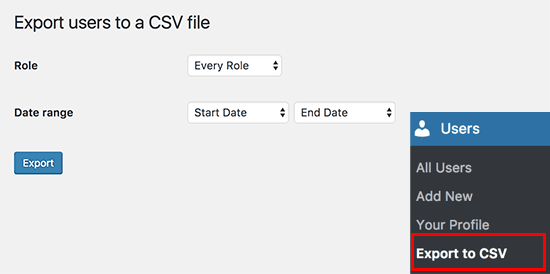
3. Now select the user role you want to export or select ‘Every role’.
4. The plugin also allows you to select a date range to download only users who joined between that period.
5. Once you are finished, click on the export button to continue.
6. The plugin will prepare a CSV file containing user data and send it to you as a download.
7. Once downloaded, you can open that file in a spreadsheet program or import it into other programs.
4. The plugin also allows you to select a date range to download only users who joined between that period.
5. Once you are finished, click on the export button to continue.
6. The plugin will prepare a CSV file containing user data and send it to you as a download.
7. Once downloaded, you can open that file in a spreadsheet program or import it into other programs.
